What i want to do for free ecomerce themes on themeforest?

What i want to do for free ecomerce themes on themeforest?


I am new to the wordpress can you please help me guys. I searched themes in themeforest.net website i downloaded the same theme in other websites for free of cost i am facing the issue when i tried to open in localhost. Is there any other solution for that Problem.What i want to do for free ecomerce themes.

Themes are about the look and feel of your site. Generally speaking you want a plugin for eCommerce. For both items you only need to search from your WP Dashboard. No need to search the web. Unless you're after something specific and proprietary, which does not seem to be the case.

Whenever you download a paid theme from some hack site you're bound to have issues. You don't know if it's complete, has malicious code in it, or has been otherwise tampered with. If you want a premium theme pay for it.


If you want a free theme then grab one from wordprtess.org or woothemes.com if you're using woocommerce plugin.

If you log to themeforest. Each month you can get free premium website template. Sometimes there is a wordpress theme. You should try.

Whenever you download a paid theme from some hack site you're bound to have issues. You don't know if it's complete, has malicious code in it, or has been otherwise tampered with. If you want a premium theme pay for it.


If you want a free theme then grab one from wordprtess.org or woothemes.com if you're using woocommerce plugin.
Do I need to upgrade to be able to use plugins?

Do I need to upgrade to be able to use plugins?


Do I need to upgrade to be able to use plugins? (I'm new to wordpress)

No, But If you're talking about a site on wordpress.com...then yes. Once you move to a self hosted WP install you'll be able to do anything you want with it. bigger learning curve, but total flexibility.

http://en.support.wordpress.com/com-vs-org/

A good free resource (PDF to download) to help you understand what WP is all about is at http://easywpguide.com/

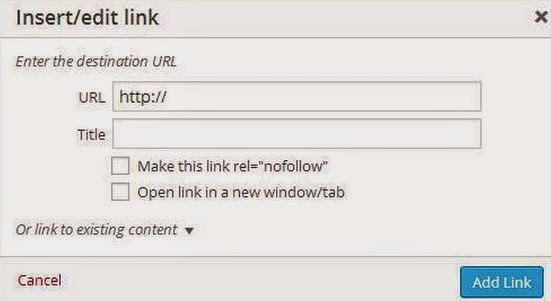
Make this link rel="nofollow"" in my WordPress post editor add link button popup.

I want "Make this link rel="nofollow"" in my WordPress post editor add link button popup. I know that its possible via Plugins that I know but I( want to know that is this possible to add without plugin like using some codes in "function.php" or not...???


Make this link rel="nofollow""

It's already there. Part of core WP - no plugins needed.

It's definitely there. Exactly as you have it in the image in your post. Just highlight some text and click on the add link button. I can't ever remember this feature not being there.

I think your problem here would be that the wp content editor is implemented in js and not in php. So unless you want to replace tinymce or whatever wp uses these days I imagine you're going to have to use a plugin, or write your own if you don't like the ones you can find.

Grab a plugin that does this. Pick it apart and dig in the code. Figure out how it does what it does and add it to your functions file.
But that would be a mistake. This is NOT something you want wrapped up in a theme. Do you want to lose the feature when you switch themes?

Themes are for layout and design -- Plugins are for functionality.
You could have had this done in 2 minutes with a plugin and we would not have wasted our time here.

If it's the same code in a plugin or the functions file there is no security issue or hanging problem. In my world, I use plugins to their advantage.
Do whatever works for you.